
To send a daily text automatically, you need something that repeats a message at the same time every day without you pressing send. Your phone can do it for free if it stays on, a few free tools can do it with limits, and a texting service can do it for a whole list. Here is how each option compares, and how to set one up.
Key takeaways
- iPhone Shortcuts can repeat a text daily for free, but it sends from your phone, so the phone has to be on.
- Google Messages and Samsung Messages only schedule one-time texts. Google Calendar stopped sending SMS alerts in 2019.
- To text a list every day, or keep sending when your phone is off, use a texting service with recurring messages.
Ways to Send a Daily Text, Compared
We checked each option against its maker’s own help pages on October 23, 2026, and set up TextSpot’s recurring texts ourselves.
| Method | Repeats every day? | Works with your phone off? | Can text other people or a list? | Cost and limits |
|---|---|---|---|---|
| iPhone Shortcuts automation | Yes | No, it sends from your phone | The recipients you pick | Free (carrier rates apply) |
| Google Messages or Samsung Messages | No, one-time scheduling only | No | Yes, one message at a time | Free |
| IFTTT “Every day at” + SMS | Yes | Yes | No, only your own number | Paid Pro plan, capped at 100 texts a month in the U.S. and Canada |
| Google Calendar SMS alerts | Discontinued in January 2019 | |||
| TextSpot recurring texts | Yes | Yes | Yes, one contact or a whole list | 1 credit per standard text. Try it with 50 message credits, no credit card required. |
Sources: Apple Shortcuts guide, Google Messages, Samsung, IFTTT SMS and plans, and Google Workspace, all checked October 23, 2026. Free tools change often, so confirm limits before you rely on one.
How to Send a Daily Text With TextSpot
- Create a free account. The trial includes 50 message credits, no credit card required, and recurring texts work on the trial.
- Choose who gets it. Pick one contact, such as your own number, or a whole list.
- Write the message. Keep it under 160 characters so each send uses one credit.
- Set it to repeat. Under “Send This Message,” choose Recurring, then set it to repeat every 1 day, pick a start date and send time, and choose when it ends: never, on a date, or after a number of sends.
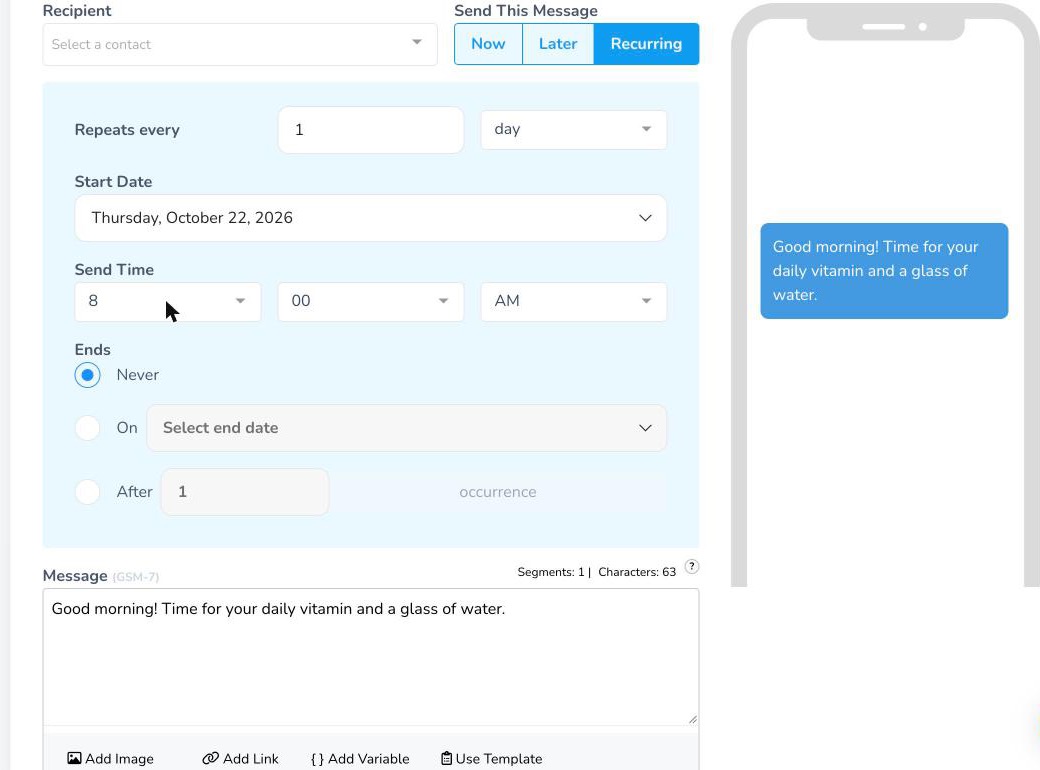
Your daily text keeps going on its own until the end you chose. On a trial, it stops when the 50 credits run out. You can also set texts to repeat weekly or monthly, or every few days. See recurring texts for more options.
What a Daily Text Costs
One standard text a day uses about 30 credits a month. On our published plans:
- A daily reminder to yourself: the 100-credit plan ($150 a year, billed annually) covers it with room to spare. The free trial covers about 50 days.
- A daily text to a list of 20 people: about 600 credits a month, which fits the 1,000-credit plan at $45 a month.
- A daily text to 90 people: up to 2,790 credits in a 31-day month, which fits the 3,000-credit plan at $97 a month.
There is also a one-time $19 carrier registration fee, paid to the carriers, not to TextSpot. Messages over 160 characters (70 if they include an emoji) use more than one credit, so check the segment count before you schedule.
Start a Daily Text List People Can Join
Lots of people want to receive a daily text: a morning quote, a devotional, a tip of the day. If you’re the one sending, you can let people subscribe themselves:
- Create a text-to-join keyword, like DAILY, that adds anyone who texts it to a list.
- Set an automatic welcome reply that says what they’ll get, how often, and how to opt out.
- Schedule a recurring text to that list.
- Share the keyword on your website, social posts, or signs. See more ways to grow your text list.
Only text people who opted in, and include “Reply STOP to opt out” in the welcome message.
Daily Text Ideas
- Medication and daily pill reminders
- Birth control reminders
- Prayer, devotional, or meditation prompts
- Chore and homework check-ins for the family
- Practice and game-day reminders for a team
- A daily special or deal of the day for customers
- Morning check-ins for staff, volunteers, or a small team