
A text subscription service, or text message subscription, sends regular texts to people who signed up for them, such as a weekly deal, a daily devotional, or a tip of the day. Most run the same way: people text a keyword to your number, get a confirmation, receive your texts on a schedule, and reply STOP to leave. Here’s how to set one up, what to send, and what it costs.
Key takeaways
- You need three things: a text-to-join keyword, an automatic confirmation, and a recurring message.
- A weekly text to 100 subscribers fits our $29 monthly plan. Daily texts to the same list move you to the $130 plan.
- U.S. carriers require registration, and registration requires a privacy policy on your website, so start that early.
How a Text Subscription Works
- Keyword. Someone texts a word, like DEALS, to your number. That’s their opt-in.
- Confirmation. They get an automatic reply that says what they signed up for, how often you’ll text, and how to leave.
- Schedule. Your message goes out to the whole list on a set day and time.
- STOP. Anyone who replies STOP is removed from future sends automatically.
Example sign-up. The business is fictional.
DEALS
You’re in! Bella’s Boutique sends 1 deal a week. Msg & data rates may apply. Reply STOP to opt out, HELP for help.
Bella’s Boutique: 20% off all fall jackets through Sunday. Show this text at checkout. Reply STOP to opt out.
Set One Up in TextSpot
- Create a free account. Start with 50 message credits, no credit card required, and pick your number at signup. The trial lets you text up to 10 contacts.
- Create your keyword. Select Keywords under “Recipients,” enter a word (3 to 20 letters and numbers), and choose the list new subscribers join. See text-to-join keywords.
- Write your confirmation. New subscribers get a free automatic reply the moment they text in. Set the wording in Autoresponders by choosing the Keyword type and your trigger word.
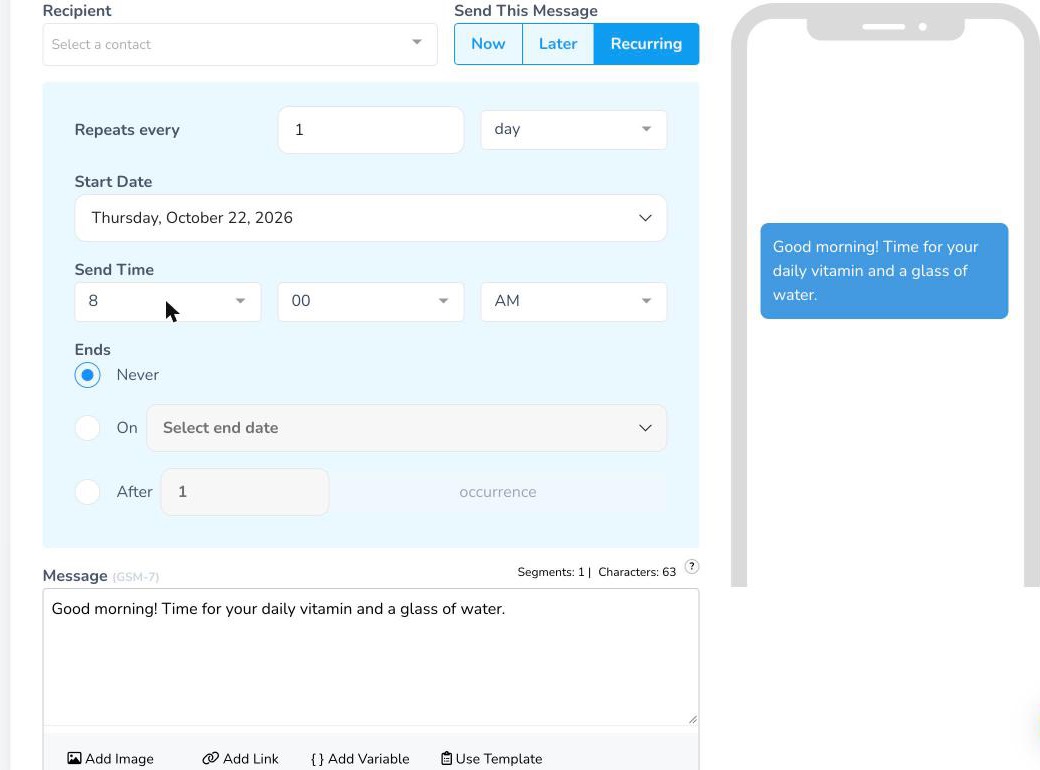
- Schedule your texts. Under “Send This Message,” choose Recurring, then set the interval, start date, send time, and when it ends. See recurring texts.
- Register with the carriers. The form is under the My Account menu, top right, and appears once you’re on a paid plan, so you can’t register during the trial.
- Promote your keyword. Put it on signs, receipts, social posts, and your website. You can also add a web form. See more ways to grow your text list.
Example Sign-Up and Confirmation Messages
Every example below is one standard text, checked for encoding and length with the same rules as our credit calculator. Placeholders are counted at 10 characters.
- Sign-up prompt for a sign or receipt:
Text DEALS to {number} for 1 deal a week from {business}. Msg & data rates may apply. Reply STOP to cancel.(109 characters, 1 segment) - Weekly confirmation:
You're in! {business} sends 1 deal a week. Msg & data rates may apply. Reply STOP to opt out, HELP for help.(108 characters, 1 segment) - Daily confirmation:
Welcome to Morning Verse from {church}. You'll get 1 text a day at 7am. Msg & data rates may apply. Reply STOP to cancel, HELP for help.(138 characters, 1 segment) - First content text:
{business}: 20% off all fall jackets through Sunday. Show this text at checkout. Reply STOP to opt out.(103 characters, 1 segment)
What It Costs to Text 100, 500, and 1,000 Subscribers
Credits equal subscribers times sends. This table uses one standard text per send, and the most sends a month can have: 5 for weekly and 31 for daily. Prices are our published monthly plans, and annual billing saves about 17%.
| Subscribers | Weekly text | Daily text |
|---|---|---|
| 100 | 500 credits: 500-credit plan, $29 a month | 3,100 credits: 5,000-credit plan, $130 a month |
| 500 | 2,500 credits: 3,000-credit plan, $97 a month | 15,500 credits: 25,000-credit plan, $400 a month |
| 1,000 | 5,000 credits: 5,000-credit plan, $130 a month | 31,000 credits: 50,000-credit plan, $700 a month |
The table picks a plan that covers the whole month. You can also stay on a smaller plan and pay your plan’s rate for extra credits, since unused credits don’t roll over. Incoming messages and auto-replies are free. There’s also a one-time $19 carrier registration fee, paid to the carriers, not to TextSpot. Messages over 160 characters (70 if they include an emoji) split into segments that use one credit each, and a text with an image uses three. Try your own numbers here:
Text blast cost calculator
Paste your message and list size to see how many credits it uses. 1 credit = 1 SMS segment.
Merge fields like {first name} are counted as 10 characters. Picture messages (MMS) are billed differently from SMS.
Registration and Consent
Two separate rules apply. Registration tells carriers who you are, and consent means each subscriber agreed to hear from you. Texting a keyword counts as an opt-in when your sign-up prompt said what they’d get and how often. Your confirmation then repeats it.
Registration costs $19 once, charged when you submit and not refunded if a submission is rejected. Approval usually takes one to five business days. No tax ID? Individuals can register as a Sole Proprietor, which is capped at one campaign and low volume. The requirement that frustrates people is the privacy policy:
Registration requires a privacy policy on your website that discloses how you collect phone numbers and what you do with them. It can be frustrating to have to edit your website in order to send messages. We completely understand that and wish it weren’t the case, but as a software provider, it’s out of our control.
Lance Beaudry, TextSpot
Before your first send, make sure that:
- Your website has that privacy policy.
- Your sign-up prompt says what people will get, how often, and that message and data rates may apply.
- Every message names your business.
- Your first message mentions STOP and HELP. TextSpot handles both replies automatically, but it doesn’t add that wording for you, so type it into your message.
Our A2P 10DLC guide covers what carriers ask for and what gets a submission rejected. On consent, the FCC says commercial texts require written consent. This is general information, not legal advice, so check the rules for your industry and state.
Free or Paid Subscriptions
Free is the usual choice for a business. The list is a marketing channel, so the subscription is free and you get repeat visits. Give people a reason to join, like a sign-up discount or early access.
Paid suits content people would pay for on its own, such as coaching tips or a devotional series. Take payment with a tool like Stripe or PayPal, add paying members to your list, remove anyone who cancels, and state the price, frequency, and how to cancel before anyone pays.
Text Subscription Ideas
- A weekly deal or members-only offer from a shop or restaurant
- A daily devotional or prayer from a church
- Daily tips from a coach, trainer, or teacher
- Local news or weather alerts
- New product or event announcements
For a message that goes out every day, see how to send daily texts automatically.
Text Subscription FAQ
How do I sign up for a text subscription?
Look for a keyword on the sender’s website, sign, or receipt, then text it to their number. You’ll get a confirmation, and you can reply STOP at any time.
Do subscribers need an app?
No. They text a word from their phone’s regular messaging app, and your texts arrive there.
How do people unsubscribe?
They reply STOP, and TextSpot removes them from future sends automatically. Replies with HELP are handled automatically too.
How often should I text subscribers?
Send as often as you promised at sign-up, and no more. If you said one text a week, keep to that.