
An SMS inbox is one place where a business sends, receives, and replies to text messages from its business number, usually in a web browser instead of on someone’s personal phone. Everyone on the team works from the same conversation history, so a customer’s text gets answered no matter who is at the desk.
Key takeaways
- An SMS inbox keeps business texting off personal phones, so conversations stay with the business when people change roles or leave.
- Replies to a mass text come back as private one-to-one conversations, not a group thread.
- In TextSpot, every team member on the account sees and replies from the same inbox, and incoming messages don’t use credits.
What Is an SMS Inbox?
It works like the messages app on your phone, with a list of conversations on one side and the selected thread on the other. The difference is who can use it and what it can do: the inbox belongs to the business number, opens on any computer, and handles replies from hundreds or thousands of contacts.
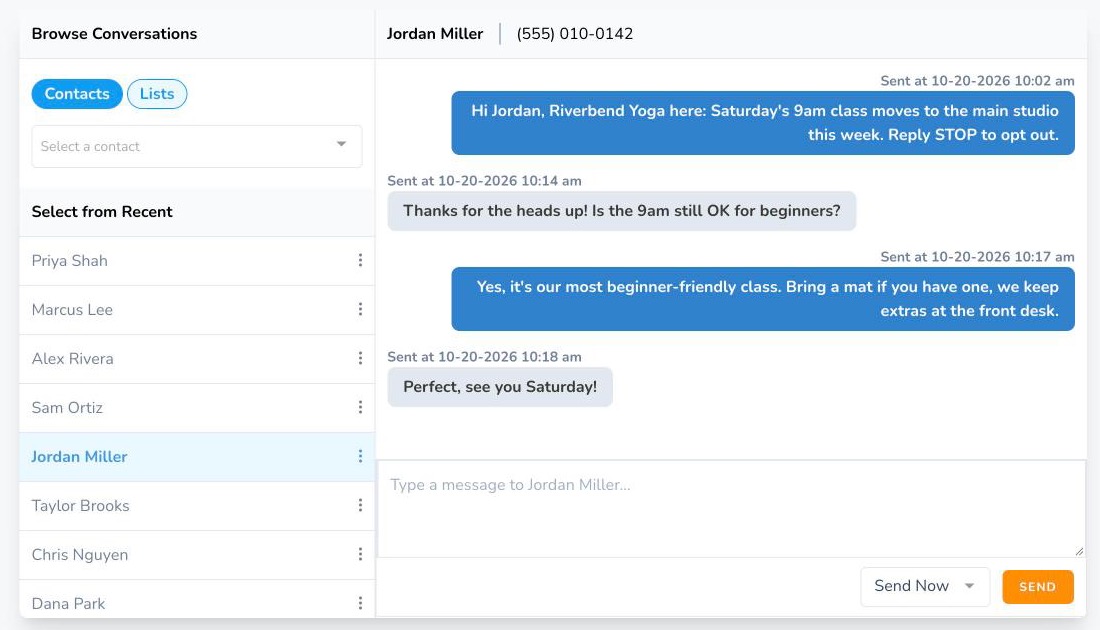
Personal Phone vs. a Shared SMS Inbox
| Texting from a personal phone | Shared SMS inbox | |
|---|---|---|
| Whose number customers see | An employee’s personal number | The business number |
| Who can reply | Only the person holding the phone | Anyone on the team |
| When someone leaves | The conversations leave with them | The history stays with the business |
| Texting a whole list | A group text that exposes every number | A mass text, with each reply coming back privately |
| Where you work | One phone | Any computer with a browser |
How Replies to a Mass Text Land in Your Inbox
When you send a mass text, each contact receives their own private copy. If someone replies, the reply opens a one-to-one conversation with that person in your inbox. Nobody else on the list sees it.
You can send a class change to 300 members, then answer the five people who reply with questions, each in their own thread. To answer common questions instantly, set up autoresponders on keywords like HOURS or YES.
Sharing the Inbox With Your Team
In TextSpot, every team member on the account sees the same inbox and can reply from it. The front desk can answer a scheduling question in the morning, and a manager can pick up the same thread in the afternoon with the full history on screen. Customers always see the same business number.
Extra team members are $10 a month each.
SMS Inbox Features
Here’s what you can do from the TextSpot inbox and the tools around it:
- Read and reply to incoming texts, including replies to mass texts
- Start a new one-to-one conversation with any contact
- See the contact’s name and number on every thread
- Send now or schedule a reply for later
- Insert a saved template instead of retyping common answers
- Personalize with variables like a first name
- Send images (MMS) and links
- Answer automatically with keyword autoresponders
Incoming messages are free. Only the texts you send use credits.
How to Set Up an SMS Inbox
- Create an account. A TextSpot trial includes 50 message credits, no credit card required.
- Register your business for texting. U.S. carriers require every business number to be registered. It’s a one-time $19 carrier fee, not a TextSpot charge.
- Add your contacts. Import a spreadsheet or add people one at a time, and only text people who agreed to hear from you.
- Send your first message. Text one person or a whole list. Every reply shows up in your inbox.
- Invite your team. Add team members so they can answer from their own computers.
Because it runs in the browser, you can also use the inbox to text from your computer without your phone nearby.
Who Needs an SMS Inbox?
Any business or organization that texts customers, patients, members, or parents and expects replies. Front desks use it for appointment questions, sales teams for follow-ups, churches and schools for event updates, and support teams for quick answers that would otherwise be a phone call.
Common uses:
- Answering questions after a reminder or announcement
- Confirming or rescheduling appointments
- Collecting RSVPs and headcounts
- Following up on leads and quotes
- Asking happy customers for reviews
Frequently Asked Questions
What is an inbound SMS message?
An inbound or incoming SMS message is any text you receive, either on a personal phone or in software like TextSpot. In TextSpot, inbound messages don’t use credits.
What is an outbound SMS message?
An outbound SMS message is any text you send. In TextSpot, each outbound text uses one credit per 160-character segment, and a message with an image uses three.
Can more than one person reply from the same inbox?
Yes. Every team member on a TextSpot account sees the same inbox and can reply from it, using the business number.
Do replies to a mass text go to everyone on the list?
No. Each person received a private copy, so each reply comes back to you alone as a one-to-one conversation.