
The Best Text Message Marketing Strategies for Summit and Virtual Event Signups
Drive more summit and virtual event signups with text message marketing. Get strategies, example messages, and automation tips from TextSpot.
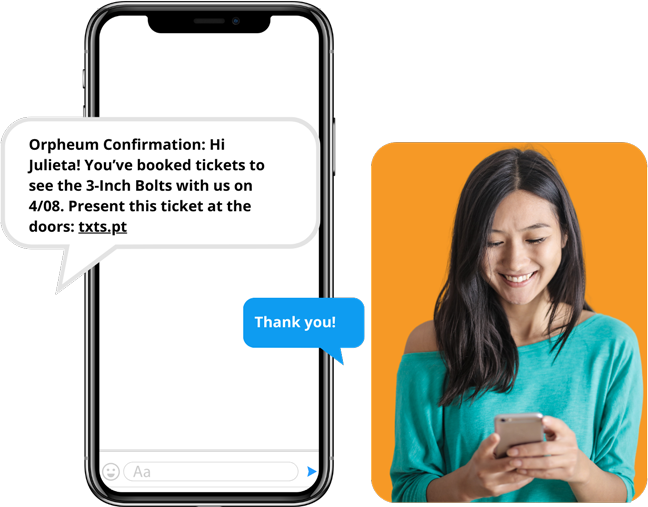
You’ve spent months building an agenda, landing speakers, and setting up registration. The last thing you want is a half-full room, virtual or otherwise.
Text message marketing is one of the fastest ways to drive signups, reduce drop-off, and keep registered attendees locked in. SMS messages are read within minutes. Email sits in inboxes. Texts get seen.
Here’s how event organizers use TextSpot to fill their summits and virtual events before, during, and after.
Why SMS Works for Event Marketing
98% of text messages are opened. Compare that to email’s average open rate of around 26–37%. When you have something time-sensitive, like a registration deadline or a day-of access link, SMS gets the message in front of people fast. Like, yesterday fast.
A few more reasons event organizers turn to SMS:
- Texts are read within 3 minutes of delivery on average
- SMS response rates are 45%, compared to 6% for email
- Registered attendees who get text reminders are more likely to show up
Our Favorite SMS Event Marketing Strategies
1. Use a Keyword to Capture Signups
Set up a TextSpot keyword—like SUMMIT or REGISTER—and promote it everywhere: your landing page, social posts, email footer, even speaker bios. When someone texts that keyword to your number, they’re automatically added to your list and receive a confirmation with the registration link.
Example: Text SUMMIT to 555-555-5555 to get event updates and your access link.
Once you set up TextSpot, you don’t have to touch it again unless you want to.
2. Run a Registration Reminder Sequence
Most people visit a landing page and leave without signing up. A text sequence changes that.
Set up an automated drip in TextSpot that sends a series of messages to your list as the event approaches. Space them out over the weeks before your summit:
- Week 4: “Registration is open for [Summit Name]. Grab your free spot here: [link]”
- Week 2: “Speakers just announced for [Summit Name]. Save your seat: [link]”
- Week 1: “Last week to register for [Summit Name]. Don’t miss it: [link]”
- Day before: “[Summit Name] is tomorrow! Here’s your access link: [link]”
Schedule it once. TextSpot sends it automatically.
3. Send an Early Bird Text
Time-limited offers drive action. Send a text to your existing contact list with an early bird discount or bonus—free replay access, a bonus session, a speaker Q&A—and a deadline. A single message to a warm list can push registrations significantly in a short window.
Example: Hi [First Name], early bird pricing for [Summit Name] ends Friday. Grab your spot for $0 here: [link]
4. Reduce No-Shows with Day-Of Texts
Registered doesn’t mean attended. Virtual events especially lose a portion of their registered audience on event day.
Send a morning text on the day of the event with a direct access link. No hunting through old emails. No Zoom link confusion. One tap and they’re in.
Example: [Summit Name] is today! Join here: [link]. Session 1 starts at 10:00 AM ET.
5. Text Between Sessions
For multi-day or multi-session summits, keep momentum going between sessions. Text your list when a new session is about to start. Include the speaker’s name and topic. That nudge sent at the right moment brings back attendees who stepped away.
Example: Next up at 2:00 PM ET: [Speaker Name] on [Topic]. Join here: [link]
6. Follow Up After the Event
Your list doesn’t stop being useful when the event ends. Use TextSpot to send a post-event text with a link to recordings, a survey, or an offer for your next summit.
Example: Thanks for joining [Summit Name]! Watch the replays here: [link]. Next summit: [Date]. Register here: [link]
Attendees who engage after one event are your best candidates for the next one.
Integrations That Save Time
TextSpot connects with tools event organizers already use:
- Zapier: Automatically add new registrants from your event platform (Eventbrite, Airmeet, Hopin, etc.) to a TextSpot list the moment they sign up
- Google Calendar: Trigger text reminders based on calendar events
- HubSpot: Sync contacts and automate SMS follow-ups alongside your email sequences
Build the workflow once. TextSpot handles the messaging from there.
What to Send (and What Not To)
SMS works because it’s direct. Keep messages short. Lead with the most important information. Always include a link.
Avoid sending more than 2–3 texts per week leading up to an event. Over-messaging leads to unsubscribes. Send when you have something worth saying, like a deadline, an update, or a reminder.
Getting Started with TextSpot
Start sending messages for $29/month. That includes 500 message credits, your own number, and all TextSpot features, including automated messages, two-way messaging, contact lists, integrations, and more.
There are no surprise fees. Carrier fees are included in your subscription, unlike other SMS providers that charge them separately. The only one-time fee is a $19 carrier registration fee required by US carriers.
Start a free trial in under 60 seconds. No credit card required.
START FOR FREE. NO CREDIT CARD REQUIRED.
Create Account
Start scheduling, managing, and automating text messages today.
Create Your Free Account
Start scheduling, managing, and automating text messages today.
No credit card required. Takes 3 minutes.