
FEATURE
Organizations
Add unlimited users to your TextSpot account so every team member can manage their own contacts and conversations.
What is the Organization Feature?
Organizations allow you to add multiple users to one account so your team can send messages without sharing logins. Each person gets their own workspace while the owner and admins stay in control.
This is perfect for teams, schools, gyms, franchises, home service companies, real estate offices, and more.
How Organizations Work
If you have a team sending texts, you shouldn’t have to share passwords or wonder who replied to which customer. Organizations fix that.
Create your Organization once. Add members. Assign roles. Start sending messages.
Each additional user beyond the Organization owner is $10/month.
Here’s how to start:
- Log in to your TextSpot account.
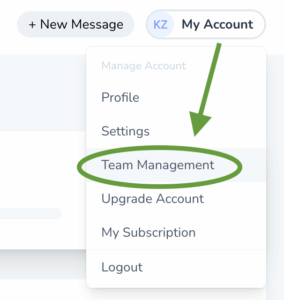
- Click My Account > Team Management in the upper right corner.
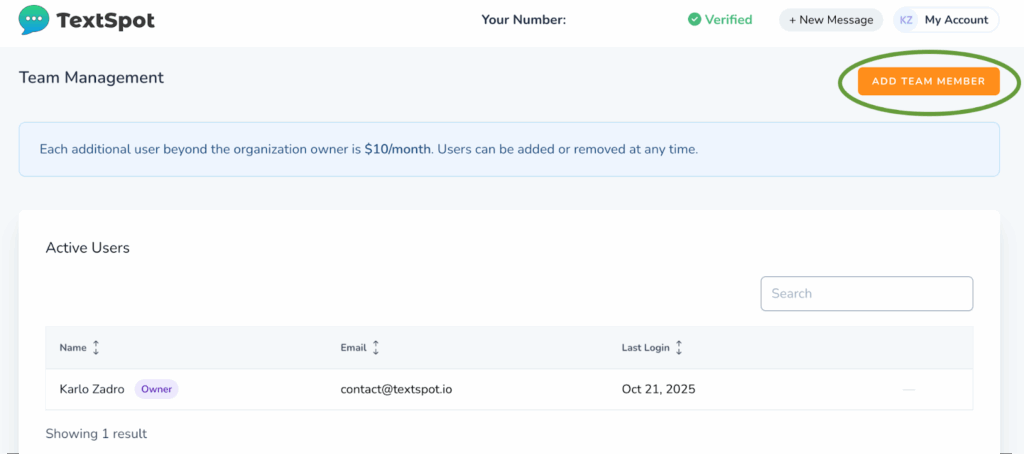
- Add members using their email addresses.
- Choose whether they’re an Admin or Member.
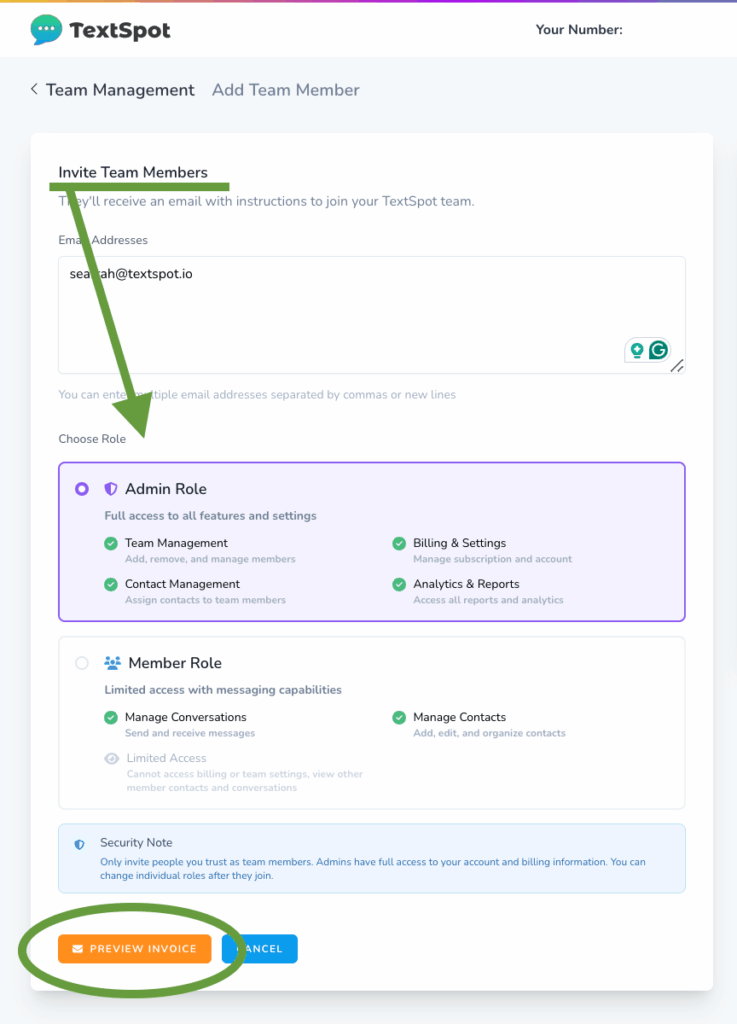
- Confirm the invoice and send invitations.
Your team can now log in, set up their accounts, and start messaging.
Roles Inside Your Organization
Admin
Admins oversee the whole Organization.
They can:
- Add or remove members
- Assign and reassign contacts
- Manage billing
- Edit all templates
- View all analytics and reports
Team Member
Team Members focus on their own conversations.
They can:
- Send and schedule messages
- Manage their own contacts
- Use shared templates
- View their own inbox
What You Can Do With Organizations
Give Every Team Member Their Own Workspace
Each user has their own login, inbox, and contact list: no shared passwords or overlapping conversations. Everyone sees only the conversations they’re responsible for, which keeps your communication cleaner and easier to manage as your team grows.
Assign and Reassign Contacts Anytime
Keep your team organized by assigning contacts to the right person with just a few clicks. If responsibilities shift or someone leaves the team, you can easily reassign contacts without losing message history.
Send All Messages From One Business Number
Your entire organization texts from one number, but each team member manages their own conversations. Customers always see a familiar sender, and your team avoids the confusion of juggling multiple lines.
Share Templates With Your Entire Team
Admins have the ability to create and share templates that can be used by everyone. This saves time on repeated messages such as reminders, updates, or confirmations.
Use Autoresponders to Reply Instantly
Autoresponders keep conversations moving even when your team can’t reply right away.
Autoresponders fire based on contact ownership:
- Assigned = Team Member’s autoresponders
- Unassigned = Organization-level autoresponders
Who Organizations Are For
Schools and Educational Programs
Teachers, coaches, and administrative staff often need their own messaging space.
Give them the ability to send class reminders, homework updates, weather alerts, field trip details, attendance notifications, or quick parent check-ins.
Gyms & Fitness Studios
Trainers and instructors communicate with their own clients constantly.
Let them send program reminders, reschedule notices, nutrition tips, invoices, follow-ups after sessions, and membership renewal nudges.
Home Service Teams
Technicians, installers, estimators, and office staff all need their own message flow.
Assign contacts to techs so they can send arrival windows, ETA updates, job progress notes, photos, scheduling changes, and follow-ups after service.
Real Estate Offices
Agents juggle buyers, sellers, open houses, inspections, and leads.
Streamline communication with appointment confirmations, showing updates, offer notifications, and closing reminders.
Franchises & Multi-Location Businesses
Teams across locations need to be able to operate independently.
Each location can handle its own promotions, meeting reminders, and staff communication.
Churches & Community Organizations
Pastors, ministry leaders, and volunteers each have groups to communicate with.
They can send event notices, volunteer reminders, weather cancellations, and youth group updates from their own accounts.
Why Use the Organization Feature
Give Your Team a Simple Way to Manage Messages
Organizations eliminate guesswork by separating conversations between users. Everyone has clear ownership of their contacts, and you avoid duplicated messages, mixed replies, or internal confusion.
Keep Communication Consistent
With shared templates and unified settings, your messaging stays aligned no matter how many people are involved.
Reduce Admin Work
Once members are added, they manage their own inboxes, contacts, and conversations. You stay in control at the top, but your team has the freedom to work without constant oversight.
Scale at Your Pace
Add more team members for $10/month each. Whether you’re expanding locations, hiring new staff, or onboarding seasonal help, your Organization can grow instantly.
START FOR FREE
Create Your Account
Sign up for a free account and get your organization on board today!
No credit card required. Takes 3 minutes.